Automatically compress large attachments
We have ended support and sales of MSH Traffic Policy. We recommend migrating to our new and actively maintained solution - a modern Postfix milter built on years of experience with this product.
Visit www.postfix-milter.com →To make life easier and save a lot of hard drive space you could automatically compress incoming, internal or even outgoing attachments. Users don’t care if they send big Excel sheet documents, PowerPoint presentations or any other files which could easily be zipped.
Not all files should be packed to a compressed format. JPEG, AVI or ZIP and RAR files already have reduced size, they’re internally compressed. Second time compressing will not decrease size, in the worst case will increase it.
Compress mail attachments larger than 5 MB
I recently needed a solution where all incoming attachments would be taken from the message, compressed and put back into the message. I didn’t want to compress outgoing traffic.
MSH Traffic Policy application is very flexible and powerful software that helps solve many problems with MTA traffic.
- Create new rule and name it Pack Incoming Attachments.
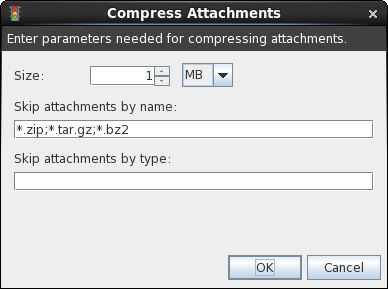
- On Actions tab click button Add and select Compress Attachments menu.
- Enter 5 MB in size section. Only attachments which are greater than or equal to 5 MB will be compressed.
- By default ZIP, TAR.GZ and BZ2 files are skipped. You can add other extensions you like. I.e. *.JPEG, *.AVI, and *.RAR.
- Click button OK.
To apply action only on incoming email messages, we need to exclude all messages which are not sent from our company domain.
- On Exceptions tab click button Add and select Message Sender menu.
- Enter your domain name using wild cards, like *@domain.com.
- Click button OK.
- Click button OK to close rule wizard.
- Click button Save All settings to apply changes.
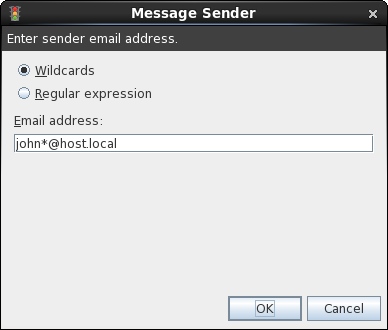
When the rule is active, all email messages which are not sent from *@domain.com will have compressed attachments.
This action gives you a whole range of options to manipulate email attachments.
If you’re looking for something else to do with attachments, like:
- detaching attachments,
- completely removing all types of attachments
- stripping them from email message and inserting info about it
- adding a new attachment to email
To learn more visit MSH Traffic Policy website.