Multiple recipients for always_bcc
If you want to add multiple destinations with always_bcc, you cannot use the default mechanism; aliases must be used instead.
With MSH Traffic Policy you don’t need to create additional entries in /etc/aliases.
If you would like to define selective always BCC for specific senders or recipients, read this post.
Select messages
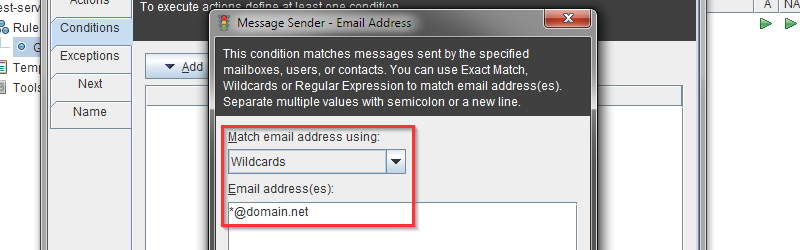
You need to select which messages should get additional BCC addresses. Go to Conditions tab, click button Add and select Message Sender menu. For this scenario, we assume we want to add BCC recipients to all messages from our domain, e.g., domain.net.
Add Envelope Recipient action
This action will work like “add bcc recipient”, it will add only envelope recipient without BCC header. Recipient of this message will not see whom also received this message.
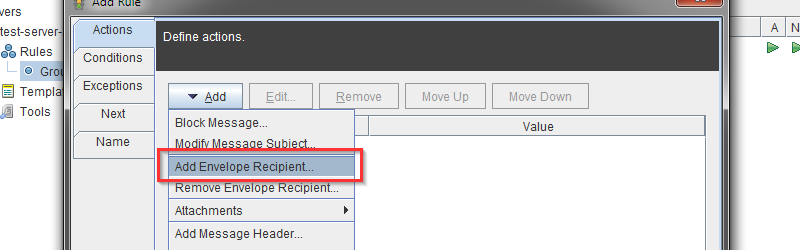
In the newly opened window, provide an address for the mailbox to which you want to forward messages. Now once again choose Add Envelope Recipient action. Add as many addresses as you want.
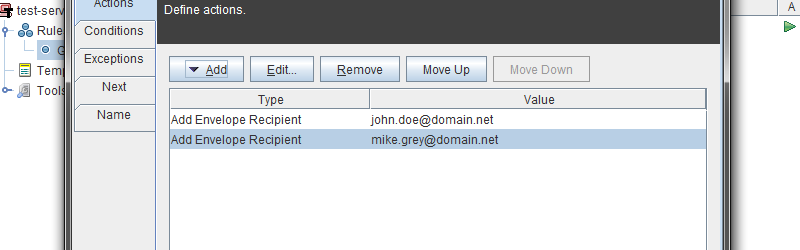
That’s it, now each message which is addressed from @domain.net will be blindly forwarded to john.doe@domain.net and mike.grey@domain.net mailboxes.
To learn more visit MSH Traffic Policy website.